HOME
TOPICS
ABOUT ME
The secret? Lossless JPEG2000, which squeezes file sizes an amazing amount.
Al Fasoldt's reviews and commentaries, continuously available online since 1983
T e c h n o f i l e
Trim those important images down to manageable file size with JPEG2000
March 20, 2005
By Al Fasoldt
Copyright © 2005, Al Fasoldt
Copyright © 2005, The Post-Standard
Can you have too much of a good thing?
When it comes to digital photos, I found that old saying to be true last fall. I'd been cataloging my digital pictures and storing them on data DVDs for a couple of years, but my file storage system was getting out of hand.
The problem was simply that I had too many disks with pictures on them. They were all over the place. I needed a way to put a lot more images on each disk. There was no way to increase the storage capacity of each data DVD -- they hold about 4.2 gigabytes, which isn't much when you're trying to store thousands of pictures -- so I had to perform a miracle. I had to squeeze all my pictures down to smaller files without altering them in any way.
It took months of spare time, but I finally did it. I converted my 240 gigabytes of photos to a space-saving format called JPEG2000, without losing a bit of quality in any of them.
JPEG2000 has a familiar-sounding name, but it's not the same as JPEG. In fact, it's not even related to JPEG, the standard image format for consumer digital cameras and for images on the Web. JPEG2000 was invented as a replacement for JPEG by different experts than the ones who came up with JPEG many years ago. So far, it's caught on slowly.
But it deserves to gain some limelight fast. Using lossless, or non-destructive, compression -- more on that shortly -- JPEG2000 squeezed some of my images to about 20 percent of their former size. On average, I saved about two-thirds of the space my photos had been occupying.
This meant I was able to store many more pictures on each data DVD. This made cataloging easier and has freed up shelf space. (At last, books have reappeared on shelves that had nothing but CD and DVD binders for years.)
My images had been stored in TIFF format. TIFF, which means "Tag Image File Format," is ideal for lossless, or non-destructive, storage in every way but one: TIFFs take up a lot of file space. (This is true even if you create compressed TIFFs, using what is called LZW compression. Big TIFFs are still big even then.)
The familiar JPEG format is OK except for a huge flaw: It uses destructive compression. Using JPEG when you're editing your pictures is always a bad idea because the quality suffers every time you save each image.
At first, I hoped the PNG format would work. PNG ("ping"), which stands for Portable Network Graphics, was developed as a free replacement for the GIF image format, which requires a paid license. It's excellent in many ways and compresses pictures by about 50 percent or more.
But my PNG conversions ruined a number of the grayscale images I scanned from my Vietnam prints, forcing me to go back to the originals. Large PNG images also seemed to open v-e-r-y slowly on both Windows and Mac OS X.
So that left PNG out of the running, and I switched to lossless JPEG2000. I was astonished by what I could do with the "destructive" form, lossy JPEG2000 -- it can trim the file size of an image by 90 percent or more without much effect on the quality -- but I decided that making any change to my images was a bad idea. I wanted to store them as-is, without loss.
(But take a look at the examples in the screen shot. Lossy JPEG2000 might not be a good idea for archiving your precious pictures, but it's spectacular for other kinds of storage. You can save an enormous amount of space.) After many tests, I decided to use lossless JPEG2000 for all my stored images. Note that I am referring not to normal JPEG2000, which alters images each time it is used, but to lossless JPEG2000.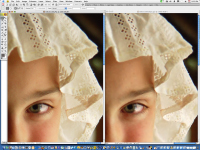
Even though you wouldn't want to use it for archiving your important images, lossy JPEG2000 is impressive, as you can note in this screen capture. The original image is at left and the JEG2000 copy is at right. The lossy JPEG2000 copy is only 144 kilobytes in size, while the original is 2.8 megabytes. Click on the small photo to see the comparison full-size.

The changeover took months of spare time, but the reduced storage requirements made it all worth while. My image database, which I created using iView MediaPro (for Windows and Apple Macintoshes, from www.iview-multimedia.com) has been slimmed down considerably.
JPEG2000 is usually built into newer image-editing and picture-cataloging software. You might be able to add JPEG2000 functionality to older programs. A previous Technofile article explains how to do this. Go to technofileonline/texts/tec032104.html.
And stay tuned. I've come across a fascinating discovery about standard JPEG images that I wouldn't have believed myself if I hadn't stumbled on it during my tests. I'll tell you about it next week.